
Connect Ask Demiton to Claude or ChatGPT.
Ask more of every job.
Five things eat the margin on every construction job: rework, missed claims, disputes, cost drift and lapsed compliance. Demiton's protections check for each of them every day and raise the flag. Ask Demiton is where you ask the next question, in the AI you already use, and the answer comes from your own registers with the record behind it.
One question for each disease.
Questions a site engineer asks, about Bridgeworks, Demiton's demo company. Once your systems are connected, your own registers answer them about your own jobs.
- Rework
“Which inspections failed on the Coomera Connector this fortnight, and has anything been built on top of them since?”
Answered from: Inspection and test results, NCRs, site diary
- Missed claims
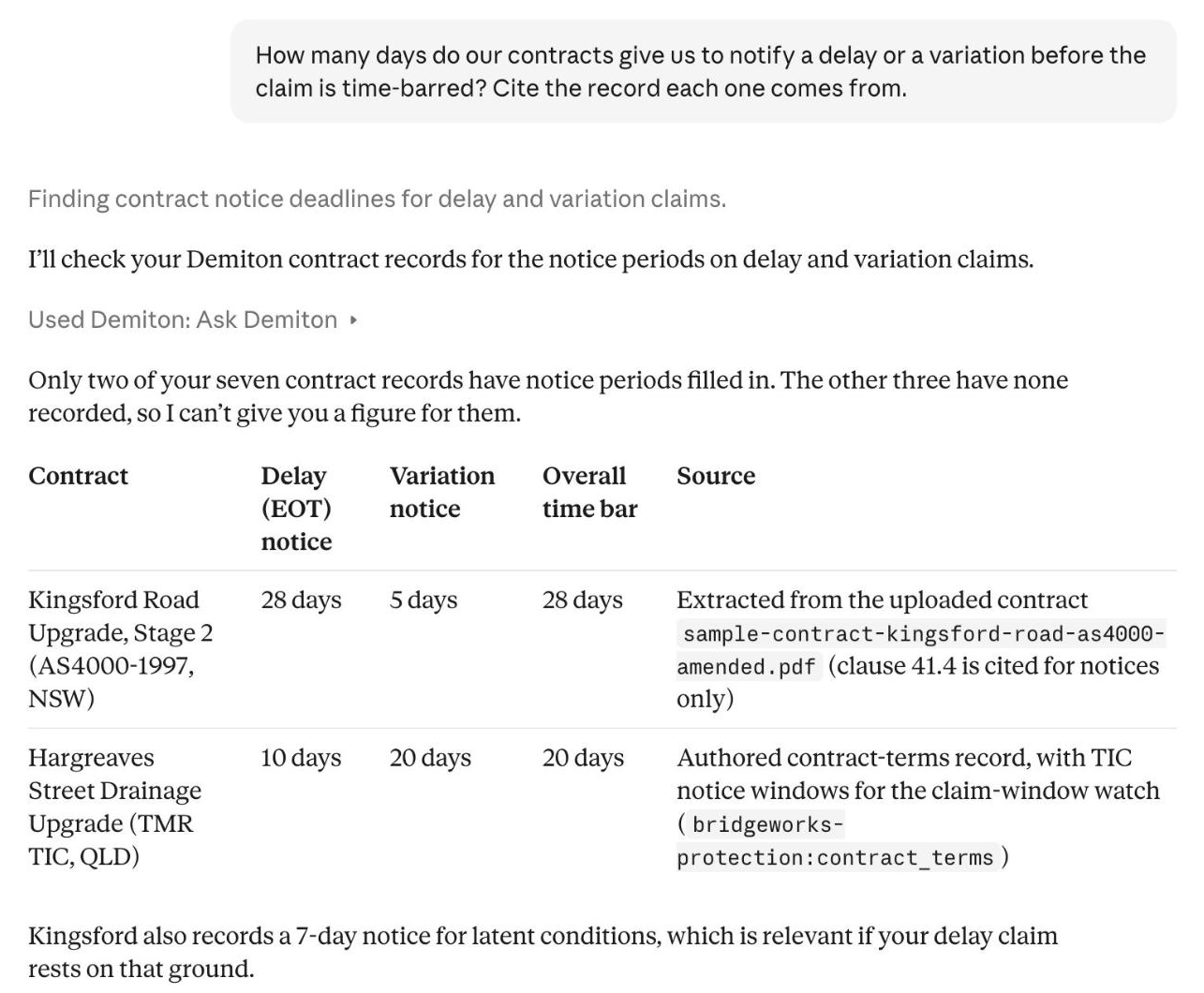
“How many days do our contracts give us to notify a delay or a variation before the claim is time-barred?”
Answered from: Contract terms, from the contracts you upload
- Disputes
“Which days on the Coffs Harbour Bypass have no site diary or day-works docket?”
Answered from: Site diary, day-works dockets
- Cost drift
“Which cost codes on the Coomera Connector have run past their tender budget, and by how much?”
Answered from: Tendered budget, job budget, budget against actual
- Lapsed compliance
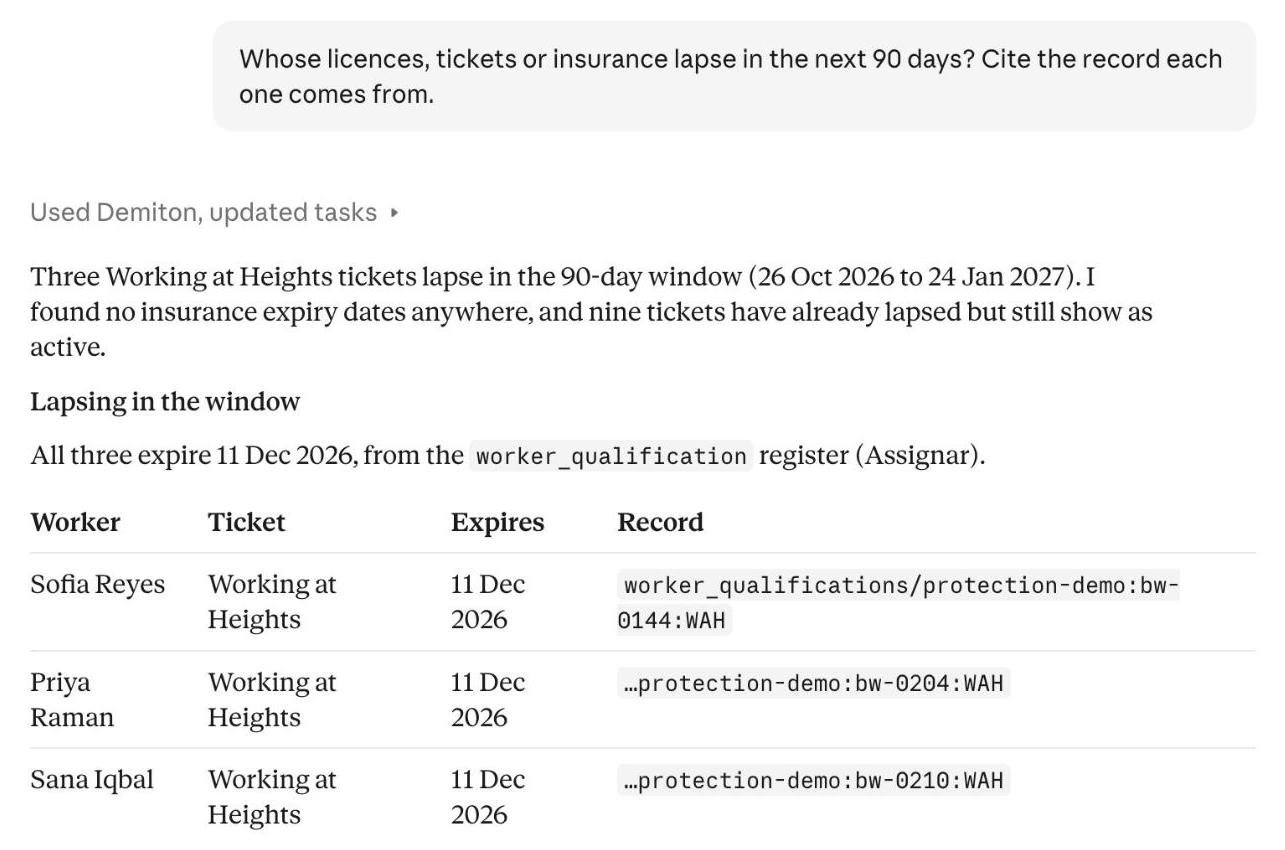
“Whose licences, tickets or insurance lapse in the next 90 days?”
Answered from: Worker qualifications, compliance certificates
The answer, and the record it came from.
Two of the questions, asked in Claude of Bridgeworks' registers. Every line names its source, and what Demiton does not hold, it says.
Claude or ChatGPT. Two minutes either way.
No installer, config file or API key. You add one URL and sign in with your Demiton account.
https://api.demiton.io/mcpclaude.ai and Claude Desktop, the same steps
- Open Customize, then Connectors.
- Click + Add, then Add custom connector.
- Name it Demiton and paste https://api.demiton.io/mcp as the server URL. Click Continue.
- Set Authentication to Sign in now and the OAuth client to Register automatically. Click Add.
- Sign in with your Demiton account when the window opens.
- In any chat, click +, choose Connectors, and switch Demiton on.
On a Team or Enterprise plan an owner adds the connector once, from Organization settings, Connectors, Add, Custom, Web. Each member then finds Demiton in Customize, Connectors and clicks Connect. Claude's Free plan allows one custom connector.
Three fields in the connector builder
| Name | Demiton |
|---|---|
| Server URL | https://api.demiton.io/mcp |
| Authentication | OAuth |
Leave the advanced OAuth panel as it is: ChatGPT finds the endpoints itself. Sign in with your Demiton account when it asks.
Claude Code, Cursor or a script? Every other client is on the install page.
Four tools. Ask Demiton does most of the work.
What your client lists once Demiton is connected.
- ask_demitonEvery plan
- Ask in plain language. The answer comes from the registers your plan reads, with the record each line came from, and says what Demiton does not hold.
- tell_demitonEvery plan
- Tell Demiton a fact or a correction and it keeps it for the next conversation. A change to one of your own systems is queued for an administrator to approve. Nothing is written straight through.
- exa_searchPaid plans
- Searches the live web when the answer is not in your registers: the current edition of a standard, a council notice, a supplier's terms. Metered per search.
- switch_orgEvery plan
- Moves the conversation to another organisation you belong to, for a contractor that runs more than one company.
Every call is checked against your Demiton sign-in, and every answer names the register it read. There is no anonymous access.
Ask it about one job first.
Start with a 6-week pilot for AU$8,000, then Baseline at AU$55,000 a year, protection included, cover to AU$100M. Free covers one job under AU$2M. Ask Demiton comes with every plan.
Common questions
What is Ask Demiton?
Ask Demiton is Demiton inside Claude or ChatGPT, connected over the Model Context Protocol (MCP). Ask about the five things that eat a job's margin, rework, missed claims, disputes, cost drift and lapsed compliance, and the answer comes from the registers Demiton keeps from your own systems, with the record it came from.
Do I need an API key?
No. You sign in with your Demiton account through OAuth 2.1 the first time you connect, and Claude or ChatGPT keeps the session. API keys are only for headless clients and scripts.
How do I add it to Claude Desktop?
The same way as on claude.ai: Open Customize, then Connectors. Click + Add, then Add custom connector. Name it Demiton and paste https://api.demiton.io/mcp as the server URL. Click Continue. Set Authentication to Sign in now and the OAuth client to Register automatically. Click Add. Sign in with your Demiton account when the window opens. In any chat, click +, choose Connectors, and switch Demiton on. A connector added on one shows on the other, because it runs from Anthropic's cloud. No config file, installer or Node.js is needed.
Can I connect it to ChatGPT?
Yes. In ChatGPT's connector builder, set Name to Demiton, Server URL to https://api.demiton.io/mcp, Authentication to OAuth. Leave the advanced OAuth panel as it is: ChatGPT finds the endpoints itself. Sign in with your Demiton account when it asks.
What does the Free plan include?
All five protections on one job under the Free cap in your market's currency, Ask Demiton, and the public data: contract awards, the Australian Business Register and Bureau of Meteorology weather. A business email signs you up, with no credit card.
What does Ask Demiton read on Baseline?
The registers Demiton fills from the systems you connect: your finance or ERP system, your field and site-diary system, payroll, and the contracts you upload. Every answer names the register and the record it came from, and every call is checked against your sign-in.