
The email starts the clock.
A direction to do extra work has a notice window, and on many jobs it is ten business days. It opens the day the email lands, not the day someone finds it in a thread. The client's engineer writes “push it to the fence line” at 09:12 on a Tuesday, the project manager replies yes because it is the right call, and the window is already running.
Demiton for Outlook is a button beside that email. Click it, pick the kind of issue and the job, press Raise. The email is kept as evidence, the person who signs off gets the request, and the countdown counts from 09:12 on Tuesday. Whether the work gets paid for comes down to a date, and the date is now on the record.
Forfeited entitlements is the disease this button is for: the claim that was real and lapsed because the notice went in late. The direction arrives as an email on most jobs, so the email is where the window has to be caught. Disputes get the same treatment from the same button: the emails are on the record the day they arrive, not reconstructed when the lawyer asks.
All five protections run every day, each against the registers that hold its facts. Where a register is still empty, the protection says which kind of system would fill it.
What the five diseases areOpen the email, click Demiton, and the panel shows four things.
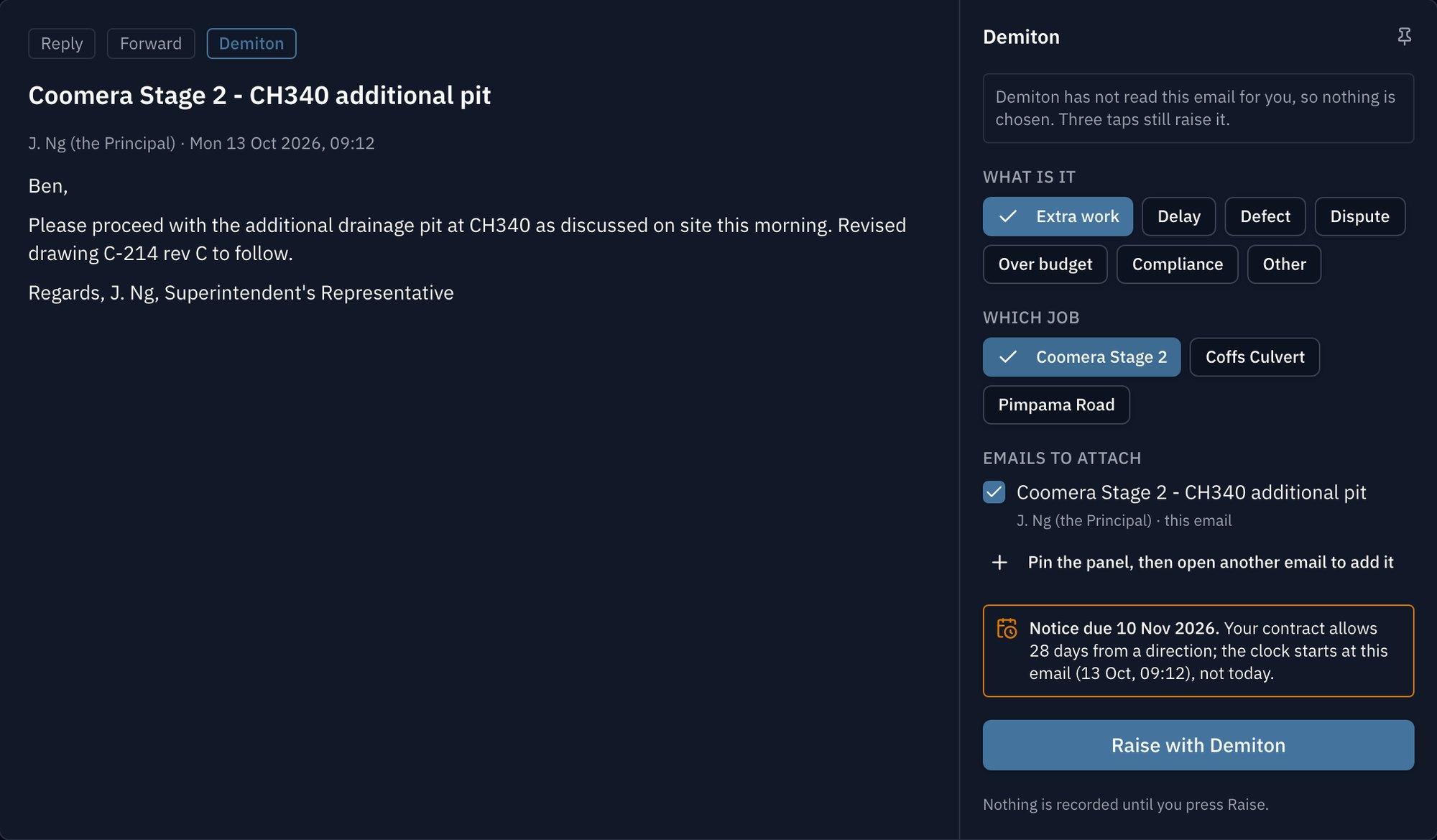
Drawn from the panel's design on the Bridgeworks demo organisation. Extra work and the Coomera Stage 2 job are picked, and the notice date, 10 November, is counted from the email's own time, 13 October at 09:12.
The kind of issue
One of seven, among them extra work, a delay, a defect and a dispute. The person picks it. Demiton does not guess yet.
The job
Matched from the address the email was sent to or a job number in it, with up to three suggestions and the reason for each.
Any related emails
With the panel pinned, opening another email offers to add it. A forwarded copy has its own message id, so raising the original and the forward makes two records.
The notice date
When the issue is extra work or a delay and the job's contract states a notice period, counted from the email's own date, not from today.
Four things happen, and the first one is the one the lawyer asks for.
The emails are kept
The originals, as they arrived, as the organisation's evidence. Not a screenshot, not a forward.
The issue is on the job
Recorded with the email's own date, and with a figure if the person put one on it: what it could cost the job if nobody acts.
Whoever signs off gets one request
The person who holds the job under Who signs off sees it in Demiton and on their phone, with the emails attached and the notice date on the card.
The countdown starts from the email
Not from the day someone noticed. Whoever raised it can withdraw it until it is answered.
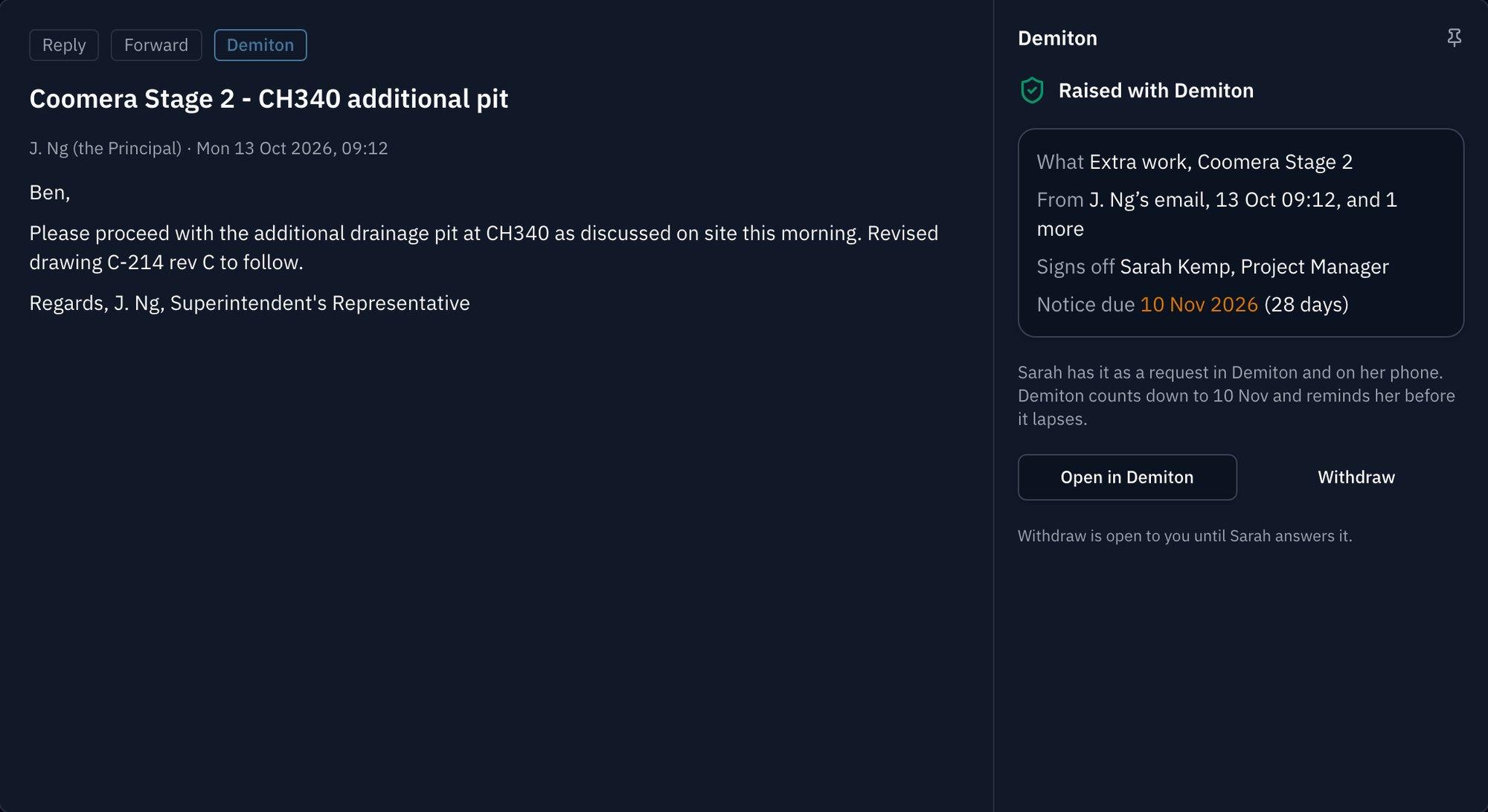
After Raise, on the same demo organisation. The project manager who signs off on the job has the request on her phone and in Demiton, and the person who raised it can withdraw until she answers.
It reads the email that is open, or the emails selected, and only when you press Raise. Nothing is read before that, and nothing else is read.
It never sends, moves, flags or deletes an email. The panel is a reader with one button.
You pick the kind of issue. A classifier that would guess it comes later, opt-in per person, after 30 days' notice of the service that would read the email.
One link. Your organisation's Microsoft 365 admin pastes Demiton's manifest link into the admin centre, and the button appears in Outlook for the people they choose. It runs on production now, in Outlook on the web and Outlook for Mac, on any plan that includes Protection.
A listing in Microsoft's store, Demiton for Outlook, is drafted and goes to Microsoft once publisher verification, a test mailbox, the screenshots and a run on Outlook for Windows are done. When it is approved, adding it is a click in Outlook's add-ins store. The add-in is the same either way.
The six-week pilot is this add-in on your own mail: installed for the organisation, at least five named people raising what is costing the job and putting a number on it, and at week six a verified figure and the plan to stop it.
The six-week pilotCommon questions
What does Demiton for Outlook do?
A person reading an email that starts something costly, such as a direction to do extra work or a delay, clicks Demiton, picks the kind of issue and the job, and presses Raise. Demiton keeps the original email as the organisation's evidence, records the issue on the job with the email's own date, asks the person who signs off on that job to act, and, for extra work or a delay on a job whose contract states a notice period, counts down to the notice date from the email.
How is it installed?
Today an organisation's Microsoft 365 admin installs it from Demiton's manifest link, and the button appears in Outlook for the people they choose. The listing, Demiton for Outlook, is drafted in Microsoft Partner Center and goes to Microsoft for review once publisher verification, a test mailbox, the listing screenshots and a run on Outlook for Windows are done. Until it is approved, ask us for the link.
Does the add-in read my mailbox?
No. It reads only the email that is open, or the emails selected, and only when the person presses Raise. It never sends, moves, flags or deletes mail.
Which versions of Outlook does it work in?
Outlook on the web and Outlook for Mac today. Outlook for Windows is tested before the store listing goes to Microsoft, because the listing names it. Outlook on a phone is not offered until it is tested.
Who can use it?
Anyone with a Demiton account whose organisation's plan includes Protection, signed in to Demiton once with Microsoft. A person with no account sees a two-line explanation and a link to register; nothing is read. A person who belongs to more than one organisation switches between them in the panel.
Does it guess which kind of issue an email is?
Not yet. The person picks the kind of issue. Automatic classification comes later, as a choice each person opts into, and only after customers have had 30 days' notice of the service that would read the email.
Put the button beside the email.
Ask for the manifest link and your Microsoft 365 admin can have it in Outlook the same day.
Ask for the install link